

Filter out any kind of bad language. The WordFilter gives your community peace of mind. Whether your community has a young audience or whether you just don’t want to show any profanity in your community’s posts or comments, the PeepSo – WordFilter keeps your content family-friendly.
What To Filter Out #
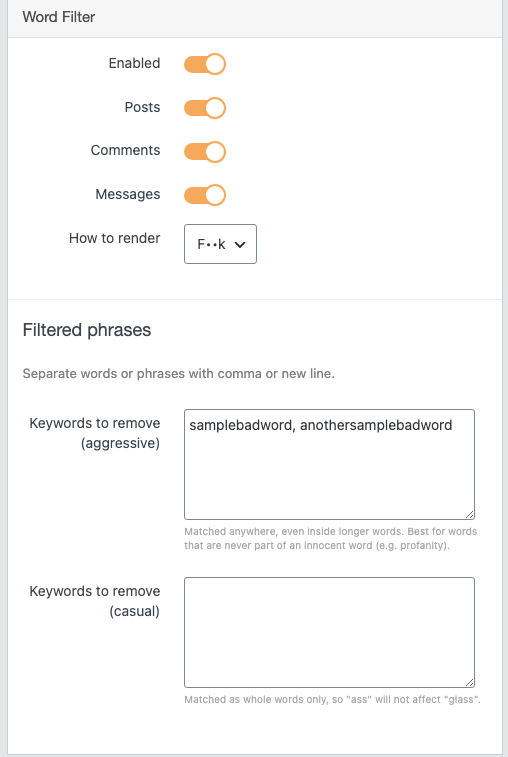
You can control your community to censor some of the bad words, you can decide yourself which words and phrases to filter out. You can add the words and phrases in backend configuration of WordFilter in Backend > PeepSo > Configuration > Moderation
Status Updates & Comments #
Decide whether to apply censorship on Status Updates and comments. This setting is available in backend configuration of WordFilter.
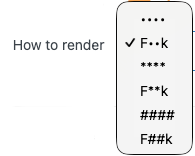
Censorship Rendering #
Decide how you want the censored words to look like. There are two options for this rendering type.
Chat.
When Chat plugin is installed and WordFilter enabled unwanted words and phrases are removed from chat conversations automatically.
You can find the settings in WP Admin -> PeepSo -> Configuration ->Moderation
Available Options #
- Enabled – to enable filtering.
- Filters for: posts, comments, messages.
- How to render – choose from the list:
- Filtered phrases – Separate words or phrases with a comma or a new line, with two options:
– aggressive – matched anywhere, even inside longer words. Best for words that are never part of an innocent word (e.g. profanity).
– casual – matched as whole words only, so, for example, “ass” will not affect “glass”.


